Running and stopped time
Track machine state automatically so utilization and downtime do not depend on manual logs.

MACHINE STATUS + PRODUCTION CONTEXT
For Australian manufacturers, monitor whether machines are running or stopped, what they are producing, how quickly they are producing it and which losses are consuming the shift. ClearRivet turns machine activity into operational information people can use.
FROM MACHINE SIGNAL TO USABLE HISTORY
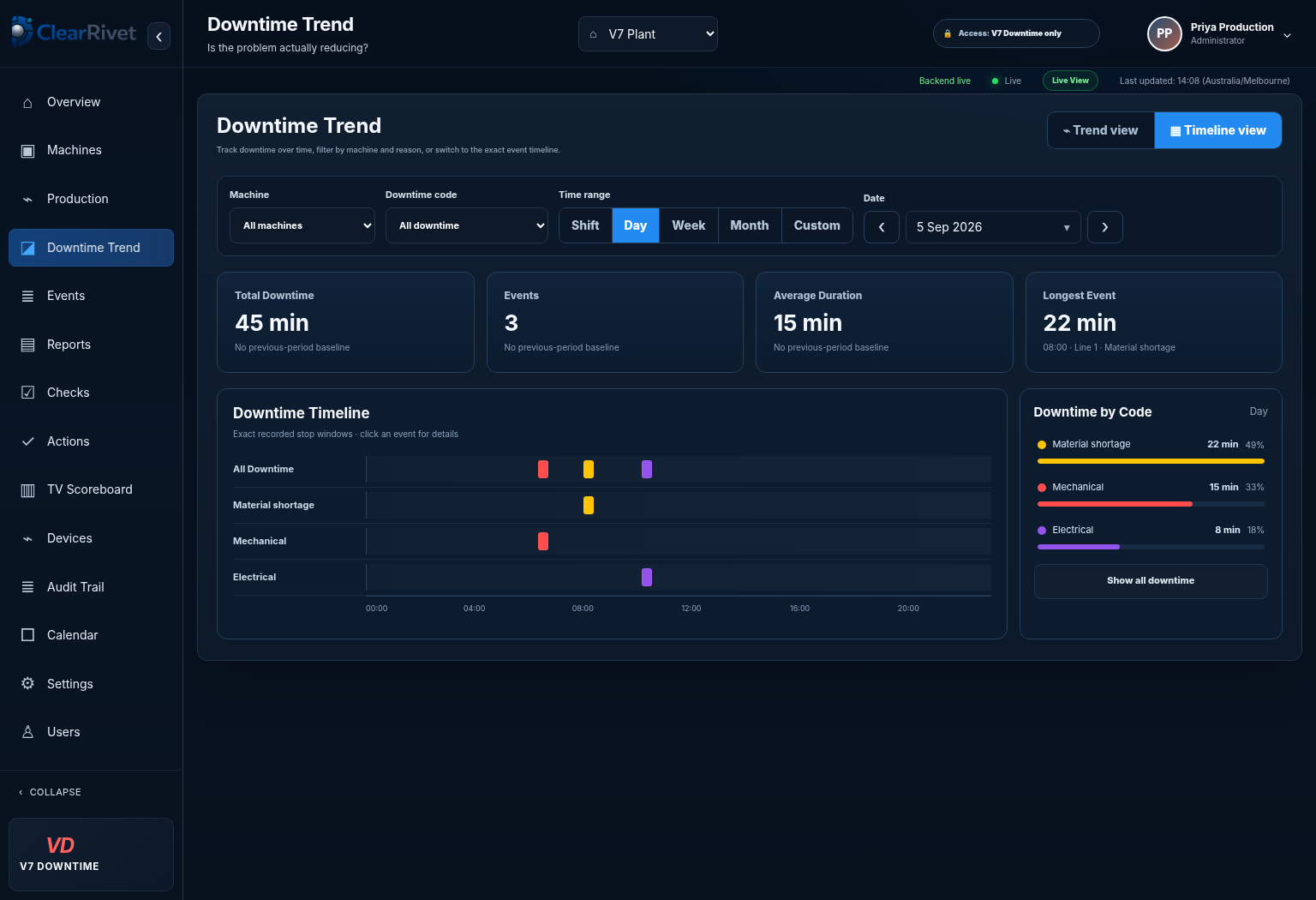
The useful outcome of a run/stop signal is not just a coloured status light. This actual ClearRivet screen shows how recorded machine stops become a timeline with duration and reason context that can be reviewed after the event.
THE OPERATING PROBLEM
A raw machine signal tells you that something changed. Useful machine monitoring adds time, counts, targets, downtime context and history so operators, maintenance and managers can understand what the machine is doing and what the loss means to production.
Track machine state automatically so utilization and downtime do not depend on manual logs.
Record production counts and rate to show whether the machine is actually delivering against the target.
Add operator context to downtime so recurring machine and process losses can be ranked and improved.
CLEARRIVET CAPABILITIES
ClearRivet is designed to keep the signal, production context and operational response in one record instead of scattering the information across paper logs, spreadsheets and disconnected dashboards.
COMMON QUESTIONS
ClearRivet is intended for manufacturing equipment where suitable production signals or controller data can be accessed safely. We confirm compatibility before deployment.
No. The standard monitoring approach is read-only: ClearRivet observes authorised production information and does not need to control the PLC or machine.
Many older machines can be monitored using isolated signals where direct PLC connectivity is not practical, subject to a technical review.
RELATED SOLUTIONS
WHAT TO MONITOR
A useful machine monitoring system does more than show whether equipment is on or off. It should help production teams understand what the machine is doing, whether output is tracking to plan and what is causing lost time.
ClearRivet connects live machine status with production context including counts, target progress, downtime, production orders and operator-entered information. That gives operators, team leaders and managers a shared view instead of separate spreadsheets and delayed reports.
FROM SIGNAL TO ACTION
Running and stopped signals are most valuable when they are connected to the reason for a stop, the current order, the target rate and the shift. ClearRivet is designed to keep that context together so recurring losses are easier to recognise and discuss.
For older equipment, monitoring can often start with a small number of reliable signals rather than a major controls upgrade. Connection method depends on the machine and plant environment, with options assessed during implementation.
See it. Then prove it.